
The Treasurer’s Report is a critical document for any nonprofit, no matter the size. Many large nonprofits have an accountant they may work with to generate this report. But for smaller nonprofits — booster clubs, PTOs, PTAs, sports teams, charities, associations, clubs and more — it’s a volunteer treasurer that is compiling and presenting the report.
Is that you? It’s in important job. Your group needs that to provide a clear and concise overview of the organization’s health. This report is conducted monthly and annually to help board members and other stakeholders make informed decisions and ensure accountability.
So, if you’re the treasurer who’s been tasked with creating and presenting this report, fear not. We’ll cover everything you need to know about the treasurer’s report.
What is the Purpose of the Treasurer’s Report?

The primary purpose of the treasurer’s report is to provide transparency and accountability into your organization’s finances. It serves as a tool for:
- Informing stakeholders: board members, members and other parties can use this information to understand your group’s current financial position.
- Evaluating performance: the state of your finances can then be compared to your budget to identify areas for change or improvement.
- Making informed decisions: that information can then be used to make changes, allocate resources differently or adjust fundraisers.
- Ensuring compliance: some groups’ bylaws require the treasurer’s report.
Monthly vs. Annual Treasurer’s Reports
It is recommended that the treasurer’s report is run and shared on a monthly and annual basis. While the core elements of these reports is the same, monthly reports often provide a more granular view of the finances, focused on recent transactions and trends.
The annual treasurer’s report offers a broader perspective, summarizing your financial performance over the entire year. It is customary for the treasurer to complete the annual report before his or her term ends. As mentioned, some groups (such as the National PTA) require this as a part of year-end reporting.
What Goes in a Treasurer’s Report
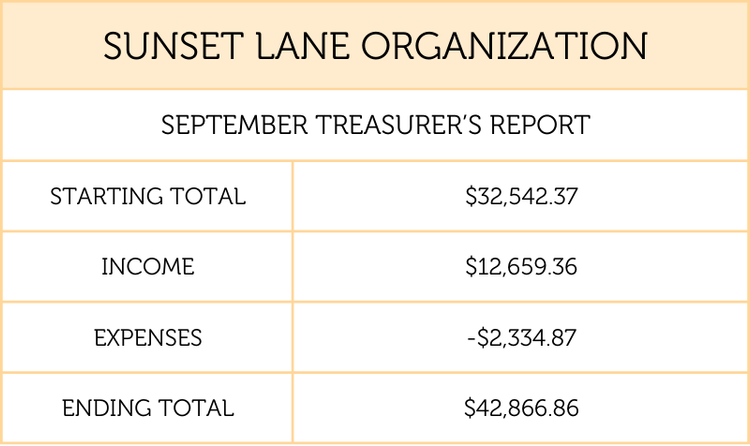
The monthly treasurer’s report
- Opening balance for each account — where you started the period. List every account separately, never rolled into one total. HOAs need operating and reserve funds shown apart, and most nonprofits need restricted funds on their own line. A single combined number hides exactly what the board needs to see.
- Total income for the period — dues, donations, fundraiser proceeds, grants, interest.
- Total expenses for the period — categorized the way your budget is categorized, so the two can be compared.
- Closing balance for each account — opening plus income minus expenses. If that math doesn’t land on your actual bank balance, something is wrong. Better to find it now than at the meeting.
Label the report with your organization’s name and the period it covers, and the written portion is done. Reports get printed, forwarded to auditors and handed to successors, so a page of numbers with no name or date on it is a page nobody can use later.
For the annual treasurer’s report, be sure to include:
- Balance carried forward from last year (“starting total”)
- Income for the year
- Expenses for the year
- Balance at the end of the year to carry forward to next year (“ending total”)
- Your name and signature
- Date the report was prepared
Flag Anything Unexpected
This is the part that separates a report from a printout, and it’s the part new treasurers tend to skip.
The four numbers tell the board what happened. Anomalies tell them what it means. If a fundraiser brought in significantly more than projected, say so — that’s money the board may want to allocate. If a line item is tracking toward exceeding its budget, say that too, while there’s still time to do something about it. Same for a large expense coming up, a grant you’re expecting, or dues collection running late.
You don’t need an explanation for everything. You need to name the thing so the board isn’t surprised by it later. A board that hears about a shortfall in March can adjust. A board that discovers it in June can only be unhappy about it.
How Much Detail Should the Treasurer Provide?
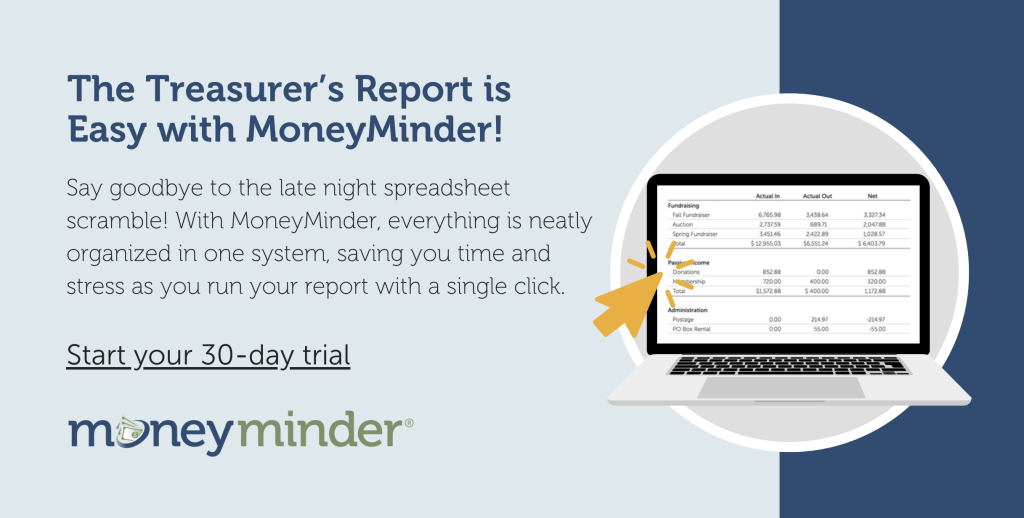
The MoneyMinder Treasurer Report includes the summary information detailed above. It is our stance that this high level information is all that non-treasurers need to understand your financial position without becoming overwhelmed. You also don’t want to derail your meetings by getting into the weeds with too much detail.
However, every group is different. If your group requires more detailed reports at meetings, there are 25 volunteer treasurer reports worth looking at. You could try the All Transactions by Category or All Transactions by Heading and Category reports in MoneyMinder. At the very least, you could have these prepared in order to answer questions, rather than handing them out and potentially opening a can of worms with people wanting to understand every nuance. You can always invite people to talk afterwards if there are specific questions.
What Doesn’t Belong
- Individual transactions. Nobody needs a list of every check. Categorized totals, with the detail available if someone asks.
- Explanations you haven’t verified. If a figure looks strange and you don’t know why, say you’re looking into it.
- Names attached to unpaid dues or individual accounts. Report the total outstanding, not who owes it. That conversation happens privately.
You Can Always Follow Up
If someone asks a question you can’t answer on the spot, the correct response is that you’ll look into it and get back to them. That’s a complete answer, not an admission of failure. New treasurers often feel they need every figure memorized and every variance explained in the moment. Nobody expects that, and guessing out loud is far worse than a follow-up email two days later. The board wants the number to be right more than it wants it to be fast.
How to Store Your Group’s Report
While it’s nice to pass out physical copies of your report, there’s usually no need to keep these physical copies beyond the meeting. You should, however, have a way to store your treasurer’s report digitally. Use a secure cloud storage platform like Google Drive to store them digitally. MoneyMinder users can also use the documents section to store reports at no extra cost beyond the annual subscription fee.
Giving the Treasurer’s Report at Your Board Meeting
Now that you’ve prepared it, it’s time to present the treasurer’s report at your next board meeting. We suggest sharing the report with your board a few days in advance so they may have time to review it. We also like handing out physical copies at the meeting, but we understand the desire to go green might supersede this suggestion.
Present your treasurer’s report on the big screen if possible, and point out your opening balance, income, expenses and ending balance for the time period you are covering. You should do this once for each bank account. Be prepared to provide additional context and answer any questions that arise. But if you don’t know the answer, you can always investigate and report back.
Be sure to check out this post with a video example of a treasurer’s report being presented at a meeting.
Feeling Nervous the Treasurer’s Report? You’re Not Alone.
Many thousands of people have downloaded MoneyMinder guides on giving the treasurer’s report. So you’re not the only one who is a bit apprehensive. The Treasurer’s Report Guide will be your best resource for all things related to the report.
Feel more confident and prepared with a comprehensive guide that includes a step-by-step guide, a sample treasurer’s report, and a written and oral script.
Questions
Generally no. That level of detail belongs in a transaction report you can produce on request, not in the report you present. Handing out a full check register invites a line-by-line discussion that will derail the meeting.
It depends on your bylaws or standing rules. Many groups require a vote to accept the annual report; others only require that it be presented. When the bylaws are silent, getting approval on the record never hurts.
Love the video, it makes me feel a bit at ease. Im not a public speaker and my memory oh gosh dont even ask.
Thank you appreciate the assistance