

Many PTA treasurers rely on Givebacks (formerly MemberHub) to manage memberships, collect payments, and support fundraising, while using MoneyMinder to keep the books organized. The two work well side by side once you know the routine: export the Givebacks payout summary, record the matching bank deposit in MoneyMinder, split it across the correct budget categories, and attach the summary to the transaction. It takes a few minutes per payout and gives you a deposit that reconciles cleanly against your bank statement.
The Givebacks payout summary
A single Givebacks payout rarely represents a single kind of income. One deposit might carry membership dues, a few donations, spirit wear orders, and event tickets, all bundled into one number that lands in your bank account. Posting that as a lump sum makes the books harder to read later, when someone asks how much memberships brought in this year or whether the fall fundraiser hit budget.
This is what the Givebacks payout summary is for. It lists the transactions included in each payout and shows the net amount that reaches your bank, which is the number your deposit needs to match.
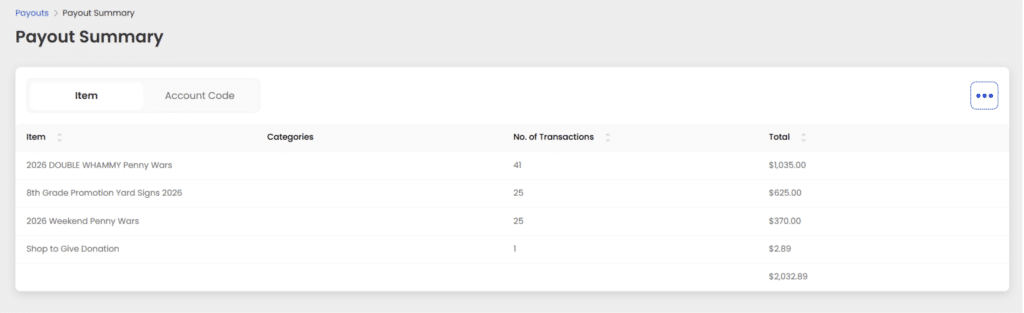
MoneyMinder and Givebacks: the workflow
Start by downloading the payout summary report from Givebacks, one summary per payout. In MoneyMinder, get the deposit into your bank register by either importing it from your bank or entering it manually.
Then, rather than posting the whole amount to one income line, split it across the budget categories the payout actually covers. Three categories, three splits. Part may belong under memberships, part under fundraising income, part under donations. Attach the payout summary to the deposit and click Save & Close, so the documentation stays with the transaction instead of sitting in someone’s downloads folder.
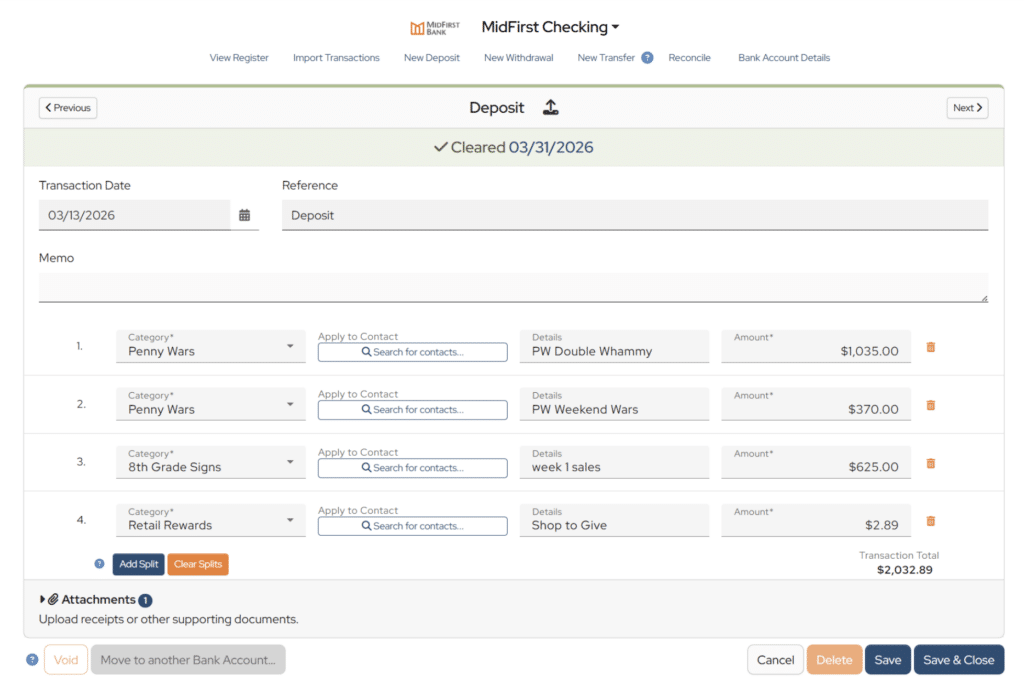
MoneyMinder’s Help Center has a full walkthrough with screenshots: Recording transactions from payment platforms like Givebacks, Givebutter, and Zeffy.
Why recording payouts this way matters
This approach creates a much stronger audit trail and helps PTAs maintain cleaner, more transparent financial records. MoneyMinder specifically recommends attaching the payout summary to the deposit, and Givebacks reports are designed to support reconciliation by showing the details behind each payout. When treasurers take a few extra minutes to download the report, split the deposit correctly, and save the backup documentation, they make month-end reviews, board reporting, and year-end audits much easier.
It’s also the step that makes a treasurer transition survivable, because whoever takes the books next inherits the reasoning and not just the numbers. In the long run, using Givebacks and MoneyMinder together comes down to consistency. A simple, repeatable reconciliation routine can help any PTA treasurer stay accurate, organized, and audit-ready throughout the year.
FAQs
Export the payout summary from Givebacks, record the deposit in your MoneyMinder bank register (imported or manual), split it across the budget categories the payout covers, and attach the summary to the transaction.
You can, but your budget reports won’t reflect where the money came from. Splitting keeps memberships, donations, and fundraising income separate.
Add a split line for each budget category the payout covers when you enter or edit the deposit in your bank register.
MoneyMinder connects directly with Cheddar Up, Square, PayPal, Stripe and Zeffy. For payment platforms like Givebacks and Givebutter, use the method described above to record payouts. Venmo payments can be recorded by importing transaction files.